Bringing the Deep Sea to Your Craft Table: The Ultimate Guide to the 3D Octopus SVG
There is something undeniably mesmerizing about an octopus. With their intricate tentacles, expressive eyes, and ability to change texture and color, they represent a perfect blend of organic beauty and complex geometry. For crafters who love to push the boundaries of what vinyl cutting machines can do, the 3D Octopus SVG is more than just a cute clipart file; it is a gateway to creating stunning, dimensional art that pops off the page or the mug.
Whether you are looking to add a nautical touch to your home decor, create unique gifts for marine biology enthusiasts, or simply experiment with layering techniques in Cricut Design Space, this digital asset offers a versatile solution. But before you download and start cutting, it is important to understand exactly what you are getting, how the different file formats work, and why this specific design stands out in a crowded marketplace of sea creature cut files.
Why Choose a 3D Style Over Flat Silhouettes?
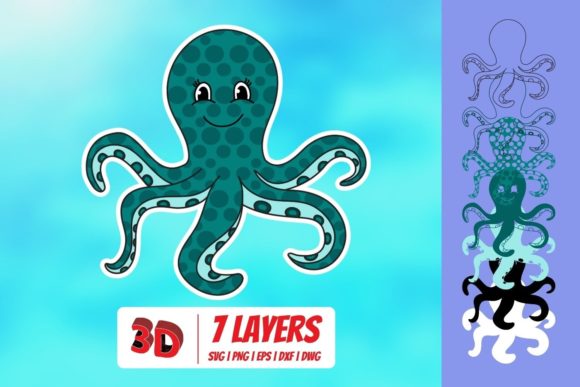
In the world of sublimation and vinyl crafting, flat silhouettes have long been the standard. They are simple, quick to cut, and easy to assemble. However, flat designs often lack depth. A flat octopus silhouette looks good, but a 3D Octopus SVG tells a story. By utilizing overlapping layers and varying shades of color (if using sublimation) or contrasting vinyl colors, you can create a sense of volume and movement.
The "3D" aspect usually refers to the design's structure rather than a literal three-dimensional object. It relies on the principle of layering. Each tentacle, eye, and suction cup is designed as a separate element that sits on top of another. When assembled correctly, these layers mimic the way light hits a real octopus, creating shadows and highlights without needing complex shading gradients. This makes the design particularly effective for beginners who might find realistic shading intimidating, yet sophisticated enough to impress experienced designers.
Understanding the File Formats: What’s Inside the Zip Folder?
One of the most common points of confusion for new crafters is understanding the difference between SVG, DXF, EPS, and PNG files. When you purchase or download the 3D Octopus SVG Download, you are typically receiving a zipped folder containing all four formats. Knowing which one to use for your specific machine and software is crucial for achieving clean cuts and high-quality prints.
The Power of SVG for Modern Cutting Machines
The SVG (Scalable Vector Graphics) format is the gold standard for modern electronic cutting machines. It is a vector-based format, meaning it can be resized infinitely without losing quality. More importantly, SVGs retain the layer information of the design. This is vital for a 3D project because you need to be able to isolate individual tentacles or body parts to apply different colors or materials.
This file is fully compatible with Cricut Design Space, allowing you to slice, weld, and arrange elements with ease. If you own a Cricut Maker or Explore series, this is your primary file type. It also works seamlessly with Silhouette Designer Edition, Make the Cut MTC, Sure Cuts A Lot (SCAL), and Brother’s Scan and Cut “Canvas” software. In these programs, you can open the SVG and immediately see the distinct layers, making assembly intuitive and fast.
DXF: The Bridge for Basic Software
If you are using Silhouette Basic Edition or older versions of other cutting software that do not support SVG imports, the DXF (Drawing Exchange Format) file is your best friend. Like SVG, DXF is a vector format that preserves the geometry of the design. However, it may not always carry over complex layer structures as cleanly as SVG in some older software environments. You may need to manually group or ungroup elements after importing. Despite this minor hurdle, it ensures that users of basic editing tools can still access the intricate details of the 3D Octopus design.
EPS: For Professional Graphic Design Workflows
For those who prefer working in professional graphic design suites like CorelDraw, Inkscape, or Adobe Illustrator, the EPS (Encapsulated PostScript) file is essential. EPS files are robust vector formats that allow for advanced manipulation of paths, curves, and colors. If you plan to modify the octopus—perhaps shortening a tentacle, changing the angle, or combining it with other text elements—the EPS file provides the highest level of control. It is ideal for designers who want to tweak the 3D Octopus SVG to fit a specific brand identity or custom layout.
PNG: The Visual Reference
Finally, the PNG (Portable Network Graphics) file serves a different purpose. This is a raster image, meaning it is made of pixels, not vectors. It cannot be cut by a machine directly. Instead, the PNG acts as a visual reference or a preview. It features a transparent background, which allows you to place the image over any background color to visualize how the final product might look. At 300 DPI, the resolution is high enough for clear viewing on screens and for printing physical mockups, but it should not be used for cutting vinyl or engraving.
Practical Applications and Project Ideas
So, once you have mastered the file formats, what can you actually make? The versatility of the 3D Octopus SVG extends far beyond simple stickers. Here are several practical applications that highlight its value:
- Nautical Home Decor: Create layered wall art using different colored vinyls mounted on foam board or wood. The 3D effect adds texture to living rooms, nurseries, or beach houses.
- Custom Drinkware: Use sublimation printing on mugs or tumblers. The layered design translates beautifully to sublimation ink, allowing you to print multiple shades of blue, purple, and pink to simulate the octopus’s skin tones.
- Apparel and Accessories: Apply heat transfer vinyl (HTV) to t-shirts, tote bags, or baby onesies. The intricate details make for a standout piece of wearable art that is conversation-starting.
- Stickers and Decals: Print the design on sticker paper and laminate it for durable decals. These are perfect for laptops, water bottles, or journal covers.
Technical Considerations for Best Results
To get the most out of your 3D Octopus SVG, keep a few technical tips in mind. First, always check the scale of your design within your software before sending it to the cutter. Because it is a vector, you can resize it freely, but ensure it fits well within the printable or cuttable area of your material.
Secondly, pay attention to line weight. Some intricate parts of the tentacles may be very thin. If you are using a fine-point blade, you should be fine, but if you are cutting thick cardstock or foam, you might want to slightly thicken the lines in your design software to prevent tearing. Thirdly, when weeding vinyl, work from the smallest details outward. The suction cups and eye details are delicate, so patience is key.
Why This Digital Asset is Worth the Investment
In a market saturated with generic animal clips, the 3D Octopus SVG stands out due to its structural complexity and artistic potential. It encourages crafters to move beyond simple single-layer projects and engage with more advanced techniques like layering and color blending. The inclusion of multiple file formats ensures that no matter what equipment you own—from a basic Silhouette to a full suite of Adobe tools—you can utilize the design effectively.
Furthermore, the demand for ocean-themed crafts remains strong. From environmental awareness campaigns to casual summer decor, octopuses are universally loved. By adding a 3D twist, you elevate a common subject into something special. Whether you are a hobbyist looking to refresh your craft room or a small business owner seeking unique products for your Etsy shop, this download provides the foundational assets needed to create high-quality, professional-looking results.
Ultimately, the joy of crafting lies in the process of creation. The 3D Octopus SVG offers a challenging yet rewarding experience. It invites you to explore the capabilities of your machine, experiment with color palettes, and bring a piece of the deep sea to life in your own home. With the right files and a bit of creativity, the possibilities are as endless as the ocean itself.